Chatbot for business: how to choose one for the task
Pick a business chatbot by the task. For a handful of repetitive questions, a scripted button bot is enough. If clients write in their own words, you need an AI bot with a knowledge base. If the bot has to book, sell and create deals, go for an AI agent connected to the CRM that can hand the conversation over to a manager.
Three kinds of chatbots for business
Three different products are sold under the word “chatbot”. In a bot builder's showcase they look the same, but the difference shows when a client writes in their own words. Before comparing vendors, decide which of the three you need.
Scripted button bot. It works on a tree: greeting, menu, branches, canned replies. The client taps “Address and opening hours” and gets the address. A bot like this is predictable and quick to build in a bot builder. It gets lost as soon as someone types their own question: “How late are you open on Saturday, and is there parking?”
An AI bot on top of a knowledge base. You load it with your price list, delivery terms, service descriptions and answers to common questions. It understands free text and answers based on those documents. It can write but not act: it can't book a client into the calendar or create a deal, and the conversation ends with an answer.
AI agent that acts in the CRM. It answers just as freely but can also act: it creates a deal in amoCRM or Bitrix24, fills in fields, sets a task for the manager, offers free booking slots and calls in a person when it's time.
How an agent differs from a scripted bot in the way it is built, we covered in our overview of AI agents for business. The question here is different: which of the three fits your task.
“How late are you open on Saturday, and is there parking?”
“How late are you open on Saturday, and is there parking?”
“How late are you open on Saturday, and is there parking?”
“Let's do 11”
Deal created in the CRM
In the calendar: Sat, 11:00
Hypothetical example: the question comes from the article, the hours and slots are made up.
Tasks businesses hand over to a bot
Start with what the bot should do. You'll choose the channel and the technology later. Almost all tasks fall into six groups, and each needs its own level of bot.
- Answers to frequent questions. Opening hours, address, delivery, stock. If the questions repeat word for word, a button bot will do. If people ask in their own words, three questions in one message, you need a knowledge-base bot.
- Booking. A salon, a clinic, a car service, a site measurement. The bot needs access to the schedule. Without it, it will collect preferences, but an administrator will still set the time.
- Lead intake. Name, phone number, what the request is about. A simple job, as long as the enquiry gets into the CRM by itself and the manager sees it right away.
- Sales. Product selection, quotes, handling objections, re-engaging those who went quiet. This is where you need an AI agent: the client asks “what about without installation?”, and the answer depends on your rules.
- Support. Order status, returns, warranty. The bot needs access to order data, otherwise all it can do is apologise and call an operator.
- Internal tasks. Staff questions about internal policies, requests to accounting, first-pass screening of job applications. A bot with a knowledge base built on internal documents works well here.
An example. A car service asks for “a bot so people call less”. We open a month of messages: most of them sound like “how much to replace the brake pads on a Solaris?” and “when can I come in?”. So there are two jobs: answering from the price list and booking. A button bot fails the first, a knowledge-base bot fails the second. What fits is an agent with access to the schedule.
Businesses are already handing these tasks to machines. According to ComNews, January 2026, 39% of Russian companies use AI agents and AI assistants. 30% of companies use them to automate customer support, and 25% each for sales and marketing.
Website, Telegram, WhatsApp, Avito, VK: where to put the bot
Put the bot where clients already write. Look at where last month's leads came from, and start with the channel that has the most of them and where they wait longest for a reply.
Website. A widget in the corner of the page. A website visitor is anonymous: they close the tab and you've lost them. Wednesday, 14:05, someone on the pricing page writes: “Do you deliver to Podolsk?” The bot answers and immediately asks for a phone number or messenger so the conversation can continue after the tab is closed.
Telegram. The easiest channel for a bot: the messenger has an open official bot interface, and buttons and menus work out of the box. It suits both clients and your team's internal tasks.
WhatsApp. Businesses connect it through the official WhatsApp Business API via a provider. A bot on a manager's personal number running through unofficial services risks getting the number blocked along with all its conversations. Check this before launch.
Avito. A buyer writes in the listing chat: “Still available?” The connection goes through the platform's API on paid plans for professional sellers. We've gathered the details on connecting and the risks in a separate article: bots for Avito.
VK. Community messages, which also have an official interface for bots. Worth it if the group is active and people actually write to it. If you have several channels, there should be one bot: a shared knowledge base, shared rules and a shared client history. Otherwise, the client writes on Telegram, then on WhatsApp, and gets two different answers.
WhatsApp or Telegram for a sales bot
The channel is usually chosen by the customer. One writes in WhatsApp because all their chats with family, doctor and deliveries are there. Another is used to Telegram and its bots. So the question is more often “how to run both”, and your chats give the answer: which channel brings the requests that reach payment.
The conversation logic is the same in both channels: the same questions, the same objections, the same handover to a manager. The agent understands voice messages and photos in both. What differs are the connection rules and how people behave.
| What we compare | Telegram | |
|---|---|---|
| Audience | Broad, often older | More tech-savvy, more often B2B and younger customers |
| Used to bots | Hardly any, so the first reaction matters most | Yes, an automatic reply is taken calmly |
| Connection | Business API via a provider, company verification | Official bot, registered in Telegram itself |
| Who writes first | Without a recent message from the customer, only with an approved template | The bot replies after the customer’s first message |
| Main risk | A bot on a personal number via an unofficial service | A setup on a personal account instead of a bot, until the first ban |
If both channels are connected to the CRM and the customer is recognised by phone number, messages from WhatsApp and Telegram go into one deal. You can also see there whether a message was delivered. If it wasn’t delivered in one channel, the manager writes in the other straight away instead of waiting for a reply that will never come.
How to pick a bot for the task and the flow of enquiries
The choice comes down to three questions. How many messages arrive per day. What share of them repeat. What one lost enquiry costs. Take the answers from your own chats and CRM; from memory they usually get badly distorted.
If you get few enquiries and they're all different, a manager can handle them alone. A bot is needed where there's no manager: at night and at weekends. In one of our live projects, GetGate, 27% of enquiries came in during evenings and weekends, and all of them used to wait until morning. A reply on Friday at 22:10 and a reply on Monday at 9:30 mean two different clients.
If the flow is large and the questions are similar, start with a knowledge-base bot. A button bot is enough when there are very few questions and they're predictable: hours, address, order status. If each lead is expensive and the client has to be questioned, quoted and booked before a deal, go for an AI agent integrated with the CRM.
The three kinds of bots compared on the points that decide the choice.
| Criterion | Button bot | AI bot on a knowledge base | AI agent with CRM |
|---|---|---|---|
| A question in the customer’s own words | Shows a menu; doesn’t understand free text | Understands and answers from the uploaded documents | Understands and answers according to your rules and knowledge base |
| What happens after the reply | Moves on to the next branch of the script | The conversation ends with the answer | Creates a deal, fills in the fields and sets a task for the manager |
| Booking the customer | Collects preferences; an administrator sets the time | Doesn’t book: it has no access to the schedule | Offers free slots and books the customer |
| Handover to a person | A “Contact a manager” button | Calls an operator if it has been set up to | Calls a manager on agreed signals and sends a short summary of the conversation |
| Where it fits | Few questions, repeated word for word: opening hours, address, order status | A large flow of similar questions asked in people’s own words | A valuable enquiry where the customer has to be questioned, quoted and booked |
| Who builds it | Quick to build yourself in a bot builder | Can be built in a bot builder if you prepare the knowledge base yourself | Needs a contractor: integration with the CRM, the schedule and several channels |
“Are you open on Saturday?”90
“How much to replace the brake pads on a Solaris?”380
“When can I come in?”260
“Oil changed yesterday, now a warning light's on”20
Illustrative example: the proportions are made up; the questions about Solaris brake pads and “when can I come in” are from the article. The number in a cell is messages per month; the stack height shows the same number.
Separately, estimate what each option will cost including customisation and support. There's a dedicated article on that: on the cost of a chatbot, so we won't dwell on price here.
What to check with a vendor or bot builder
A bot builder works if you need a button bot or a simple knowledge-base bot and are ready to build it yourself. You need a contractor when the bot has to work with your CRM, your schedule and several channels at once. Either way, ask the same questions.
- How are channels connected: official APIs, or by logging in with your username and password?
- Does the bot create a deal in the CRM, which fields does it fill in, does it merge duplicates by phone number?
- What signals make the bot call a person, and what does the manager see in the notification?
- Who updates the knowledge base when prices change, and can you fix an answer yourself?
- Does the bot understand voice messages and photos?
- What does the bot do when it doesn't know the answer: honestly call a manager, or make something up?
- Where are the chats stored, and how does that square with personal data law?
During the demo, ask a question that isn't in the script. For example: “What if I'm in Tver, can you deliver by Friday and assemble it on site?” A button bot will show its menu. A good agent will answer based on your terms or honestly say it will check with a manager.
Ask them to show how the bot is tested before it goes live with clients. A sound answer goes like this: we run it on your real chat history, read the first 20 conversations after launch in full and fix the knowledge base. The answer “everything's set up, we're launching” means your clients will be doing the testing.
Mistake one: a bot for the sake of a bot
The bot is installed because “the competitors have one”. There's no task, and nobody has defined what a ready lead is. The bot says hello, shows a menu of six buttons and sends everyone to “Contact a manager”. The client goes through an extra step, and the manager gets the same flow as before.
Before launch, write down in one sentence what the bot should do. “Answer the delivery question and get a phone number.” “Book a trial class.” “Collect the opening dimensions and schedule a measurement.” If the sentence won't come together, it's too early to start with a bot.
The second form of the same mistake is a bot for the whole website and every channel at once. It's wiser to launch it on one channel or for one service, read the first conversations, fix the answers and only then expand.
Mistake two: the bot can't call a human
Thursday, 19:20, a customer writes on WhatsApp: “Yesterday you delivered the wrong colour, I'm really upset.” The bot replies with a menu: “Choose the topic of your request.” She writes again, gets the same menu and leaves to write a review. One conversation like that is enough to spoil the impression of the whole company.
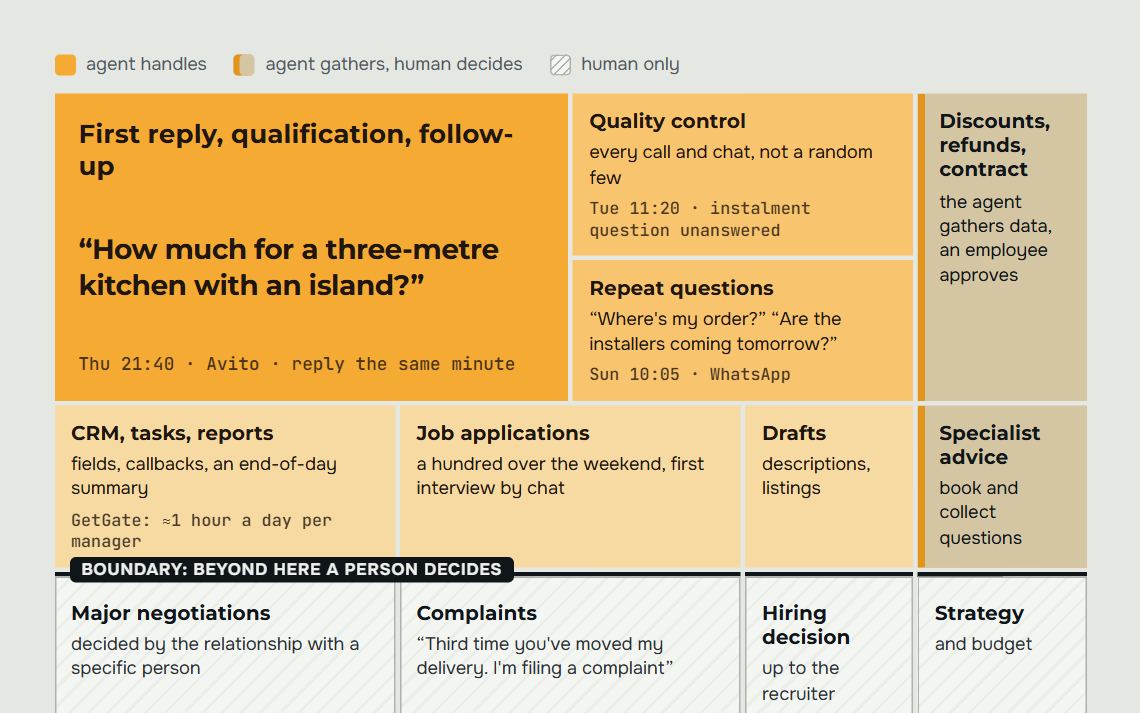
Handover rules are set in advance, in the words of your own process: a complaint, haggling below a threshold, a non-standard order, a request for a call, readiness to pay right now. When the bot spots such a signal, it tells the client who will reply and when, and sends the manager a short summary of the conversation. The manager carries on in the same chat without asking the same questions again.
AI can write almost like a human. We ran a blind comparison on real chats: in 80% of cases the assistant's reply was rated no worse than a human's. But complaints, discounts and large orders remain the manager's territory, and a good bot knows that.
Mistake three: the bot lives apart from the CRM
The bot collected the name, phone number and wishes, but the lead stayed in the builder's dashboard. Someone opens it once a day, if they remember. The client who left a number in the evening has already agreed with someone else by morning. The bot worked; the sale didn't happen.
When connected to a CRM, every conversation becomes a deal. The card holds the chat, the channel, the filled-in fields and a dated task for the manager. The head of sales sees all of the bot's conversations, not a sample, and can count how many leads came through it and how many of them got as far as payment.
Also check merging. A client wrote on Telegram, then called, then replied on WhatsApp. If the bot and the CRM don't recognise them by phone number, three deals with three managers will appear in the pipeline, and the report will start lying.
Where to start choosing
Open the last month of conversations across all channels. Write down the frequent questions, note what hours messages come in and at which step clients drop off. That table will show you the job, the channel and the level of bot you need better than any presentation.
- Put into one sentence what a ready lead means for you.
- Choose one channel and one task for the first launch.
- Decide where the bot answers on its own and where it calls in a manager.
- Make sure enquiries reach the CRM and don't get lost between channels.
- Read the first 20 conversations in full and fix the answers.
If your review shows you need an agent that replies in every channel, books clients and runs the deal, take a look at how we built our sales robot. It works in Telegram, WhatsApp, on Avito and on your website via amoCRM. And for where else AI comes in handy in a sales department, see our breakdown of implementing AI in business.
Frequently asked questions.
Which chatbot should a small business choose?
The one that handles your main task in the channel where clients already write.
If the questions are similar and a manager replies during the day, a knowledge-base bot for evenings and weekends will do. If each lead is expensive and the client has to be questioned and booked, go for an AI agent integrated with the CRM. Start with one channel and one task, and expand once you've read the first conversations.
Can you build a business chatbot yourself in a bot builder?
Yes, if you need a button bot or a simple bot that answers from a knowledge base.
A bot builder is fine for menus, FAQs and collecting contact details. Things get hard when the bot has to create deals in the CRM, check the schedule, merge a client across channels and hand the conversation to a manager with a summary. That part is usually set up by a contractor.
Do you need a separate bot for each messenger?
Better one bot for all channels: website, Telegram, WhatsApp, Avito and VK.
Then it has one knowledge base and one set of rules, and the client history is shared. If each channel has its own bot, a client who first wrote on Telegram and then on WhatsApp will get different answers, and the CRM will end up with two deals instead of one.
Which to choose for a sales bot: WhatsApp or Telegram?
The channel your customers already write in, and more often both. The bot logic is the same in each; the rules differ: WhatsApp requires the Business API and approved templates for the first message, while in Telegram a bot is easier to connect.
What matters more is that both channels lead into one deal in the CRM. Then a customer who writes in both places gets one answer, and the manager sees the whole history.
Will a chatbot replace a sales manager?
No. The bot takes over the first reply, clarifications, booking and filling in the card, especially at night and on weekends.
Haggling, complaints, non-standard orders and large deals stay with the manager. A good bot hands such a conversation over to a person along with a short summary, and the manager picks up where the bot left off.
How can you tell a chatbot is working well?
Read the conversations and check what became of them in the CRM.
For the first weeks after launch, read the conversations in full: where the bot gets confused, where the client leaves, which answers are out of date. After that, check in the CRM how many enquiries came through the bot and how many of them got as far as a booking or payment. Go through complaints about the bot separately, one by one.
Let's audit your business
Leave a request and on a free consultation we'll find where customers are being lost, suggest which service to start with and price it around your goal.
Rather not fill in a form? Message our agent on Telegram — it replies right away and books you a review.