AI agents for business in 2026: which ones and what for
In 2026, AI agents for business already work in sales, call quality control, recruiting, support and CRM routine. Hand over first the area where money is lost and there are many identical actions: usually that is the first reply to incoming leads. Leave decisions on discounts, hiring and conflicts to people.
Where AI agents for business already work
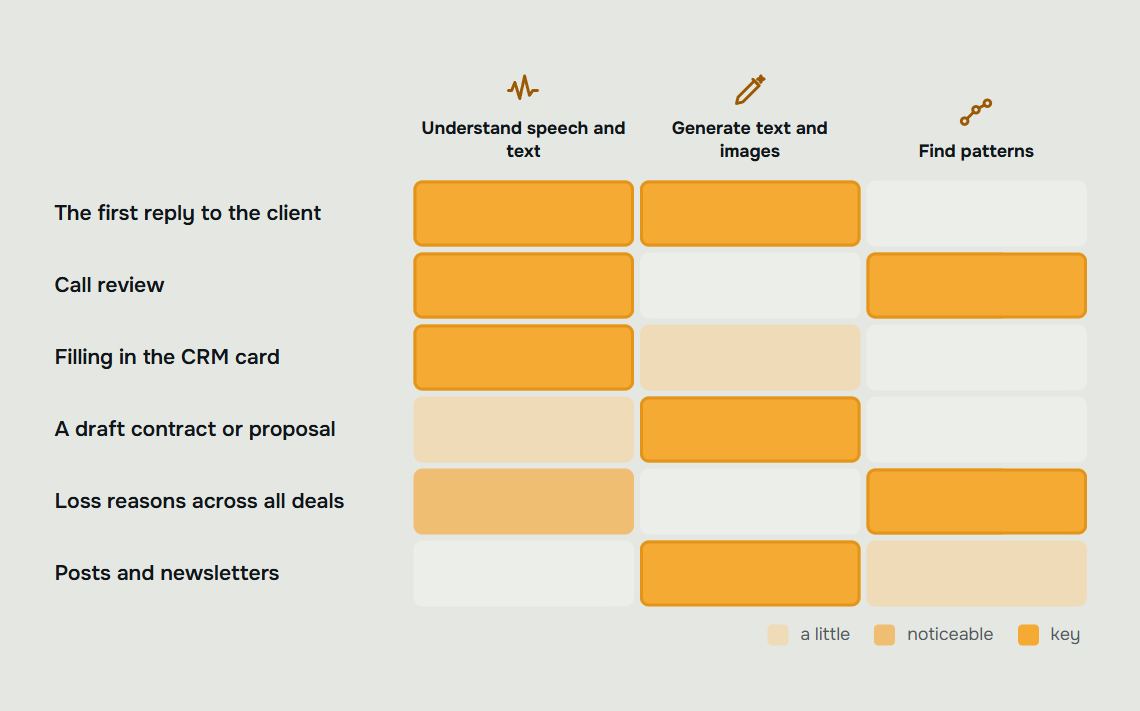
AI agents for business take root best where there are lots of similar conversations and it's clear what counts as a good result. The first line of sales, call reviews, job applications, repeat customer questions, CRM records. In these areas the agent runs the conversation, fills in the fields and passes to a person whatever needs a decision.
How an agent differs from a chatbot and what it is made of is briefly explained in the next section. The main part of the article is about use: which areas can already be handed over, where it is better to wait and where to start so that after the first launch you have something to compare.
According to ComNews in January 2026, 39% of Russian companies already use AI agents and AI assistants. Most often they automate document workflows and request handling (70%); HR processes are covered at 34% of companies, customer support at 30%, sales and marketing at 25% each. The study was carried out by SberAnalytics and Sber Business Soft; full details in the ComNews article.
An illustrative example: the area of a tile is the volume of identical work in that area.
What an AI agent is and how it differs from a chatbot
An AI agent is a program that is given a goal rather than a script. For example: “find out what the customer needs and book a measurement visit.” The agent reads free text, decides for itself which steps are needed and carries them out in the company’s systems: creates a deal, sets a task, books a meeting.
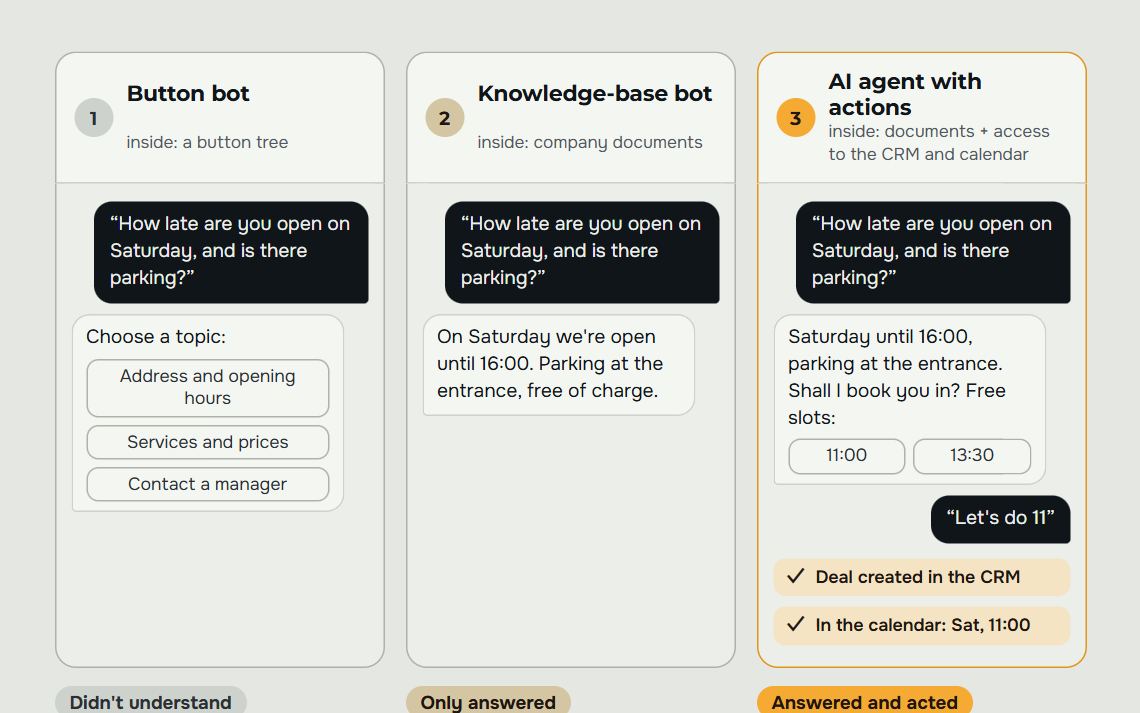
A scripted chatbot is built like a tree of branches. While the customer follows the branches, you can’t see the difference. It shows up on the first phrase outside the script: “What if we have two warehouses and our own delivery, can you handle that?” The bot looks for a branch about warehouses, doesn’t find one and replies “I didn’t understand you.” The agent answers to the point and asks what is missing for the estimate.
| What we compare | Scripted chatbot | AI agent |
|---|---|---|
| What it is given | A script: step, button, next step | A goal and rules |
| How it talks | Buttons and canned replies | Free-form text, voice messages, photos |
| An unfamiliar question | Doesn’t understand or sends back to the menu | Answers from your materials or calls a person |
| Memory | Only within the current branch | Remembers the conversation and the client's history |
| Actions | Usually only replies | Creates a deal, sets a task, books a meeting |
| What the manager gets | Name, phone number and the menu item chosen | The gist of the request, conditions, the customer’s doubts and what was agreed |
| How to change it | Redraw the script | Add to the materials and rules |
What an agent is made of
Four parts. The language model understands what is written and formulates the answer. Tools give access to the CRM, calendar, prices and stock: without them the agent can only talk. Memory keeps the current conversation and the customer’s history, so people don’t have to repeat themselves. Rules set what must not be promised and when to call a person.
The model knows nothing about your business until you tell it. Before answering, the agent searches your materials for pieces relevant to the question: price list, terms, frequent questions, managers’ good answers to objections. If the agent often replies “I’ll check with a specialist”, the knowledge base almost always just lacks the needed piece.
When an ordinary chatbot is enough
A script isn’t useless. Where the customer’s path is single and no questions come up, a tree of branches is cheaper and more predictable: booking a free slot, checking an order status, choosing from three options. Buttons are faster than typing in such cases.
You need an agent when the conversation stops being a questionnaire and the customer has conditions, doubts and a situation of their own. The old bot’s scripts don’t go to waste in the switch: questions, answers and the handover procedure are moved into the agent’s materials. How to choose between types of bots for a task is covered in our article on chatbots for business.
Types of AI agents: a comparison
Agents differ in two ways: what work they do and how they are built. By work, they divide into customer-facing (sales, support), internal (CRM, hiring, documents) and analytical (quality control, reports). By build, into agents built into a CRM, assembled in a no-code builder and made for the company's own process.
The second trait determines how much the agent can do on its own. A comparison of four build options:
| Agent type | How it works | Strength | Weak spot | Who it suits |
|---|---|---|---|---|
| Built into the CRM | Switched on in the CRM settings and works with its cards | A fast start, customer data is already in place | Does what the CRM developer built in; complex scenarios and some channels are unavailable | Companies with one CRM and simple customer questions |
| From a no-code builder | Assembled on a platform without programming: knowledge base, scenarios, channels | You can launch it yourself | The link to the CRM, telephony and warehouse is set up separately; the client monitors answer quality themselves | When there is an employee ready to look after the agent |
| Built for the company's process | Built around the funnel, channels and rules of a specific business, works inside the CRM | Knows your prices, objections and rules for handing over to a person | Requires time to analyse the process and people on the client side who check the answers | When the agent handles customers and a mistake costs money |
| An employee assistant on a general-purpose model | A chat with a language model, sometimes with access to company documents | Useful from day one: drafts, summaries, searching internal rules | Does not handle customers or write to the CRM on its own | For internal work with texts |
The difference between an assistant and an agent shows on a single lead. The assistant suggests a reply text to the manager. The agent replies to the customer itself, records the outcome in the card, sets a call-back task and follows up a week later.
Which agents for which tasks: 2026 selection
Below is a selection by business task. The last column shows the metric that tells you, a month after launch, whether the agent is working.
| Task | Which agent | What to connect | How to tell it works |
|---|---|---|---|
| Leads at night and on weekends wait until morning | A first-line sales agent | Messengers, Avito, website, CRM | Time to first reply, share of leads that reach a meeting or a site measurement |
| Deals get lost inside conversations | A quality control agent | Telephony, chats, checklist | Share of conversations checked against the checklist; mistakes that repeat from one manager to the next |
| Customers write “Where is my order?” | The support agent | A CRM with order statuses | How many repeat questions are closed without a manager |
| A hundred applications over the weekend | A recruiting agent | Job site, questionnaire, interview calendar | Time to reply to a candidate, share who reach an interview |
| Managers fill in the CRM by hand | A CRM routine agent | CRM, telephony, messengers | Empty fields in cards, deals with no next step |
| Other sellers on your marketplace product cards | A product card monitoring agent | The marketplace seller account | How many foreign offers were removed; at Health and Beauty Technology, 7 out of 7 other shops were removed from an Ozon card on the first day |
| Newcomers flood the manager with questions | An internal rules assistant | Company documents and knowledge base | How many questions still go to the manager |
| A drop in leads is noticed at the end of the month | An analyst agent with alerts | CRM, ad accounts, Telegram | How many hours after the dip the message arrives |
The main areas are covered below in order: what the agent does, where it hands work to a person and where to start.
Sales: first reply, qualification, follow-up
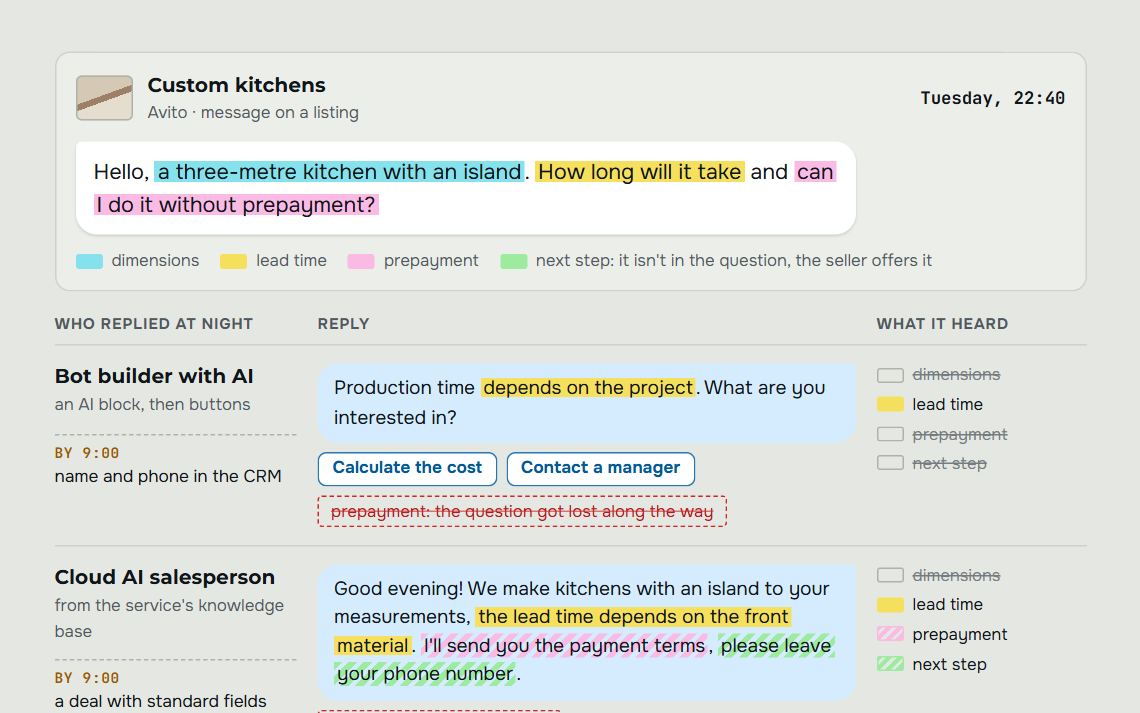
The most common scenario starts with a message at an awkward time. Thursday, 21:40, a client writes on Avito: “How much would a three-metre kitchen with an island cost?” The manager has already gone home; the reply will come in the morning. By morning the client has struck a deal with whoever answered first.
The agent replies within the same minute and in the same channel: Telegram, WhatsApp, Instagram, Avito or your website. It asks two or three clarifying questions about dimensions, timing, city and budget and records the answers in the deal card in amoCRM. It also handles a voice message or a photo of measurements, so the client doesn't have to type anything out.
Qualification is the other half of the work. The agent separates “just asking” from a client who’s ready for a measurement, and hands the hot one to a manager along with the conversation history. In the morning the manager opens the card and sees the full picture: what’s needed, by when, and what put the client off about the price.
Follow-up closes the third gap. The client took a pause “to think it over”, and a week later nobody remembered them. The agent writes to them itself, recaps what was discussed and suggests the next step. This area is described in more detail on the page about the sales robot.
Conversation quality control
A head of sales usually manages to listen to a few calls a week and picks them almost at random. The agent reviews every call and chat, one after another, checks each conversation against the checklist and flags where it went off track: the need wasn't uncovered, the price wasn't named, no next step was agreed.
An example from a typical review. Tuesday, 11:20, a call: the client asks about instalments twice, and both times the manager drifts off into talking about materials. In the CRM the deal is marked “thinking it over”. The agent flags it as “client question left unanswered”, and the head of sales finds the deal in the morning report while the client still hasn't gone elsewhere.
These scores add up to manager scoring: you can see at which stage a particular person loses clients most often. The team meeting turns into a review of three or four real conversations instead of general calls to “work better”. How it works is shown on the page of quality control.
The same checklist is applied to the agent itself. If it answers at too much length or forgets to ask about timing, that shows up in the same reports as the managers’ mistakes. It’s handy to keep people and the agent on one scale: you can see straight away which conversations can already be handed over.
Recruiting: applications and the first interview
Over a weekend, a sales manager vacancy gets a hundred applications. The recruiter opens the list on Monday and realises the most active candidates have already been invited by other companies. They were simply answered faster.
The agent processes applications as soon as they arrive. It messages the candidate, asks about experience, schedule and pay expectations, runs a first interview by chat and puts together a shortlist. Instead of a pile of CVs, the recruiter gets a few candidates with their answers and notes on each.
The hiring decision stays with a person. The agent screens by clear criteria and shows why it screened someone out. Assessing motivation and whether someone will fit the team is a job for the recruiter or the hiring manager. More about this area on the page AI recruiting.
Support and repeat requests
Repeat questions eat time without anyone noticing. “Where’s my order?”, “Can we move the installation to Saturday?”, “Please send the invoice again.” Each answer takes a couple of minutes, but there are dozens a day, and they’re answered by the same manager who’s supposed to be selling.
The agent sees the client’s history in the CRM and answers to the point: it gives the status, offers free dates, sends a document. Sunday, 10:05, a client writes on WhatsApp: “Are the fitters coming tomorrow?” The agent checks the card, confirms the time and reminds them to clear the way to the kitchen.
Repeat sales are a separate benefit. A client who bought a kitchen six months ago asks about a water filter. The agent recognizes them by their number, remembers the previous order and passes a warm enquiry to the manager. Without an agent, a message like that easily gets lost in the shared chat among questions about delivery.
Internal routine: CRM, tasks, reports
The CRM holds the most manual work that nobody counts. Moving data from a chat into the card, setting a callback task, moving a deal to the next stage, pulling together an end-of-day report for the head of sales. Each action is small, but together they eat up a noticeable part of a manager's day.
The agent does this as the conversation goes. The client sends the dimensions — the fields are filled in. They ask for a call back on Friday afternoon — the task is set. At the end of the day the head of sales gets a summary: how many enquiries came in, how many were qualified, which deals are stuck with no next step. Plan versus actual is visible right away, broken down by channel and manager.
Alerts for dips deserve a separate mention. Wednesday, by lunchtime there are noticeably fewer new enquiries in the pipeline than usual. The head of sales gets a message in Telegram and has time to check the ads and telephony before the end of the day. Without an alert, a drop like that only surfaces in the monthly report.
In a live GetGate project, this setup freed up about an hour a day for the manager. The figure applies to one project and depends on how much routine there was before launch. That hour usually goes on calls to clients worth closing in person.
Marketing: copy and feedback from enquiries
In marketing, the agent is useful in two places. The first is drafts from a brief: product descriptions, FAQ answers for the website, ad variants for Avito. The marketer gets a base in minutes and spends their time editing and fact-checking.
The second is more valuable and rarer. An agent that handles first conversations knows what questions clients from each channel come with. Say Telegram ads bring in people who only ask the price and then vanish. The marketer will see this in the per-channel breakdown before the campaign budget runs out.
It’s too early to hand the agent strategy, positioning and decisions about where to invest money. It can tell you what clients are saying; the decision stays with you. How we connect client acquisition with sales is described on the page about marketing.
Where an agent doesn't belong yet
There are areas where a mistake costs more than the time saved. A large deal with long negotiations, where the relationship with a specific person decides everything. A complaint from an angry client: “That’s the third time you’ve moved the delivery, I’m filing a complaint.” The agent should hand a conversation like that to an employee right away, with the history, and without trying to calm things down with a stock phrase.
Decisions with legal and financial consequences also stay with people: a discount beyond the rules, a refund, a change to contract terms. The agent can gather the data and prepare the question; the responsible employee confirms. The same goes for hiring and firing.
Be careful with advice that specialists are accountable for: medical indications, legal advice, structural load calculations. The agent can book the client in with a specialist and collect their questions in advance. The substantive answer should come from whoever bears responsibility for it.
The last case is chaos in the process. If you have no CRM, the pipeline stages aren't described and prices live in one manager's head, the agent has nothing to rely on. Put the process in order first, otherwise the agent will quickly and confidently repeat the same mess.
Which area to hand to the agent first
Choose along two axes: how much money is lost in an area and how much repetitive routine there is. The best first candidate is where both coincide. Usually that's the first reply to incoming leads: the money walks out with the client who didn't wait for an answer. And the questions repeat day after day.
To check yourself, answer a few questions:
- How many leads a week wait more than an hour for a reply?
- Which questions do clients ask most often, and can the answers to them be written down?
- How many calls can the head of sales actually listen to?
- How many job applications go unanswered for more than a day?
- Which fields in the CRM do managers fill in by hand after every conversation?
Start where the answer sounds most alarming. If you get few enquiries and managers keep up, it makes more sense to start with quality control: it shows where deals are lost and changes nothing in how you talk to clients. If there are lots of enquiries and they pile up overnight, start with the first line of sales.
Summary by area: what the agent takes over and what your first step is.
| Area | What the agent does | Where to start |
|---|---|---|
| Front line of sales | Replies at any hour, asks clarifying questions and records the answers in the deal card | Write down customers’ frequent questions and the rules for when to call in a manager |
| Quality control | Reviews every call and chat against a checklist and flags where the conversation went wrong | Write down three to five checklist points you are ready to act on |
| Recruitment | Sorts applications, runs the first interview by chat and puts together a shortlist | Describe the criteria for screening candidates out; leave the hiring decision to a person |
| Support and repeat requests | Answers about order status and dates using CRM data and passes requests for a new purchase to a manager | Make sure order statuses and customer history are in the CRM |
| CRM routine | Fills in fields, sets tasks and compiles an evening summary for the head of sales | Mark the fields managers fill in by hand after every conversation |
| Marketing | Drafts texts and shows which questions customers from each channel come with | Start by breaking down questions by channel; keep the strategy for yourself |
Hypothetical placement. Every business scores the axes differently: the scores come from answers to the five questions in the list above.
We tested separately how far an agent can be trusted with live chats: in a blind comparison on real conversations, the assistant's reply was no worse than a human's in 80% of cases. The remaining cases are a reason to set up, right away, the rules for when the agent calls in a manager.
Step-by-step implementation
The first step is a review of your team: where money is being lost, which channels are connected, what's already in the CRM. We start by reading real chats and listening to calls. On paper the process usually looks neater than in real life.
Step two is the build. We set up the pipeline in amoCRM, train the agent on your prices, answers and objections, and connect the channels. We also spell out the handover rules separately: which words from a client make the agent call in a manager, and which topics it doesn't touch at all.
On your side, this step needs people who know the product. They check the agent’s answers against real client questions and fix the wording. The more honest the price list and the list of objections, the fewer surprises after launch.
Step three is a supervised launch. The agent replies, managers see every conversation and correct it, and quality control checks both the people and the agent. Step four: we compare plan and actual, fine-tune the scenarios, and only then carry the approach over to the next area: support, hiring or reporting.
Whoever you choose as a contractor, five questions show whether they implement an agent or sell a boxed product:
- Does the agent only answer, or does it have access to the CRM and the calendar?
- What does it do when it doesn’t know the answer?
- Who owns the materials and the settings once the work is finished?
- Does the work include refining answers in the first weeks after launch?
- Where are conversations stored, and what data goes to the model?
The last question is not a formality. Conversations with customers are personal data, their processing in Russia is governed by Federal Law 152-FZ, and your company becomes the operator. Many models run on foreign servers, and sending texts there counts as cross-border transfer with its own requirements. If the contractor can’t answer, the risk stays with you.
The whole path from review to scaling is laid out on the page about implementing AI in business. If you’re not sure which area to take first, start with a review: it will show you where your biggest losses are.
Frequently asked questions.
What kinds of AI agents for business are there in 2026?
By work: sales, support, quality control, recruiting and CRM routine agents, plus employee assistants for documents. By build: built into a CRM, assembled in a no-code builder and made for the company's process.
For customer work where a mistake costs money, companies more often choose an agent built for their process: it knows your prices and the rules for handing over to a person. For internal texts an assistant on a general-purpose model is usually enough.
How does an AI agent differ from a chatbot?
A chatbot is given a script, an agent is given a goal. The bot follows a pre-drawn branch and gets lost on any question outside it. The agent understands free text, remembers the customer’s history and acts in the CRM itself: creates a deal, sets a task, books a meeting.
For short identical conversations, such as booking a free slot, a button bot is enough. You need an agent when customers describe their situation in their own words and every situation is a little different.
Which department is best to hand to an AI agent first?
Usually the first thing handed over is answering incoming requests: that is where money is lost and the same questions repeat, so the result is easy to measure. If there are few requests and managers keep up, start with quality control of conversations.
Don’t launch the agent in every department at once: each area needs its own rules. Once the first one is set up, the approach is carried over to support, hiring or reporting, and the mistakes of the first launch stay in one area.
Will an AI agent work if the company has no CRM?
Without a CRM, the agent has nowhere to keep the client history and nowhere to record the outcome of conversations. It will still be able to reply, but the head of sales won't see what's happening with leads.
That's why implementation usually starts with building the CRM: a pipeline that fits your process, channels and telephony. The agent works inside it, filling in deal cards and setting tasks.
Can an AI agent be trusted to screen candidates without a recruiter?
No, the hiring decision stays with a person. The agent sorts through applications, asks candidates questions, runs a first interview by chat and puts together a shortlist.
The recruiter sees the candidates' answers and the reasons the agent screened out the rest. Motivation, and whether the person will fit the team, are judged by the recruiter or the team lead.
What does the agent do if a client is angry or asks for a discount?
The agent hands such conversations over to a manager. The triggers for handover are set in advance: a complaint, a threat to leave, a request for a discount beyond the rules, a question about a refund.
The manager gets the full conversation, and the client doesn’t have to repeat everything. The agent makes no promises beyond its instructions.
Let's audit your business
Leave a request and on a free consultation we'll find where customers are being lost, suggest which service to start with and price it around your goal.
Rather not fill in a form? Message our agent on Telegram — it replies right away and books you a review.