Why the CRM accumulates overdue tasks
Чаще всего просрочка появляется из-за процесса: звонок состоялся, а новую задачу никто не создал, и система записала просрочку. Пока следующий шаг держится на памяти менеджера, просрочка — вопрос времени. Чинится правилами в CRM: задача появляется по событию, а не по тому, вспомнил ли о ней человек.
Why overdue tasks are not about a salesperson being lazy
Просроченные задачи чаще всего копятся из-за процесса: звонок состоялся, а новую задачу никто не создал, и система считает это просрочкой.
The manager opens the CRM, sees the list of overdue tasks and thinks about discipline first. The salesperson swears they called the client, they just did not create a new task. And often that is true: a task can show up in the CRM as overdue simply because nobody created a new one for tomorrow — the call happened, but the system never learned of it.
The cause is usually how the process around a task is built. If the next step relies only on the manager’s memory, overdue tasks are inevitable — the only question is when. The more deals in progress, the faster the gap grows between what’s really happening and what the report shows.
A separate category is tasks nobody created at all. There are deals with a long-term interest where the decision is postponed for months, and there are more urgent ones that quietly slide into the same heap without reminders. As long as the CRM has no clear rule about when and which task appears, the overdue will grow by itself.
Where the line runs between normal and alarming
There is no universal threshold for overdue tasks that suits every department alike. The deal cycle, the number of salespeople and the specifics of the niche are too different for one figure to describe the norm for everyone. Going by someone else's percentages from articles online is a bad idea: they were calculated on a different business.
It is more sensible to look at the dynamics inside your own CRM: is the share of overdue growing week on week or falling. If after introducing new rules for setting tasks the number of overdue deals goes down, the movement is in the right direction, even if the absolute number is not yet ideal. If it grows — that is a signal to investigate rather than to hope it passes by itself.
The second benchmark is a breakdown by deal type. Overdue tasks on hot clients ready to pay now are far more critical than on long-interest deals, where a monthly reminder is a normal rhythm. Mix them into one number and the real problem gets lost.
Three reasons tasks turn into overdue
The first reason is technical: due dates or notifications aren’t set up in the CRM. The task formally exists, but nobody gets a reminder on time.
The second is process: pipeline stages don’t create tasks automatically, so a next step appears only if the manager remembers it.
The third is motivation: tasks are created properly, but the manager ignores them because they see no link between a timely call and the result.
These three causes need different solutions, and it is easy to go wrong here. If the problem is technical and the manager starts fining people for overdue, nothing will change — the salesperson physically never got the reminder. If the problem is motivational and the company tunes the notifications, tasks will simply be closed formally, without an actual call.
Mixing the causes is the most common mistake when analysing overdue. A sales department introduces new rules in the CRM, waits for improvement, and the figure does not move because the real cause was somewhere else. Separating these three layers is the first step towards actually fixing the problem rather than spending time on symptoms.
How to tell the cause apart from the CRM reports
The technical cause is quick to spot: open the deal cards and check whether every task has a due date and a notification for the assignee. If some tasks hang without a date or an assignee, it’s a setup issue. It’s fixed once in the CRM; talking to the employee won’t help here.
The process cause shows up in the report by pipeline stage. If deals regularly get stuck without a task at some step, automatic creation isn’t set up for that stage. For example, a deal moved to “negotiation”, but a call task appears only when the manager creates it by hand. It shows as unevenness: some stages have almost no overdue tasks, others have them systematically.
The motivational cause is revealed by a breakdown by individual salespeople with the process set up identically. If some employees have overdue close to zero and others consistently high with the same tools, the CRM is not the issue. Here quality control helps: listening to calls and scoring against a checklist show whether the salesperson really carries out the task or merely closes it with nothing behind it — this is handled by quality control.
Task cards
- Call the clientno deadline
- Send a proposalno assignee
- Call back after measuringnotifications off
Technicalset up deadlines and notifications
Deals without a task, by stage
Processan auto-task at the stage where deals stall
Overdue tasks by manager
Motivationala conversation and oversight, not new rules
The report snippets are an example. Bars show proportions, not real numbers.
Ready automation rules that close the technical cause
In amoCRM, overdue tasks caused by forgetfulness are solved by rules that fire without a person. The first is automatic task creation with a deadline at every pipeline stage: the deal moves to a status and the system sets the next step with a specific due date itself.
The second is automatic escalation: if a task isn’t closed on time, both the assignee and their manager get notified.
The third rule concerns stage changes: when a deal moves further down the pipeline, the old task is closed automatically or recreated for the new stage.
Without this rule, ghost tasks pile up in the CRM for years: the deal moved on long ago, but the old task hangs there overdue and skews the whole picture. It shows most when a manager tries to count the real overdue rate and runs into dozens of dead tasks.
All three rules are set up once at pipeline level and then run by themselves. The call still has to be made and the conversation held to the checklist, but forgetting to set a task becomes impossible. Setting up pipelines around the client’s process and rules like these is part of CRM implementation.
What a sales robot does where rules do not save you
Automation in amoCRM solves the technical cause of overdue but does not solve the problem of an enquiry arriving when the sales department is physically not working. In the live GetGate project 27% of enquiries came in the evening and at weekends — they used to wait until morning, and by the time the salesperson sat down at the computer the first-contact task was already overdue by time, even if it had been created properly. How to automate sales as a whole, not only CRM tasks: a step-by-step plan with tools.
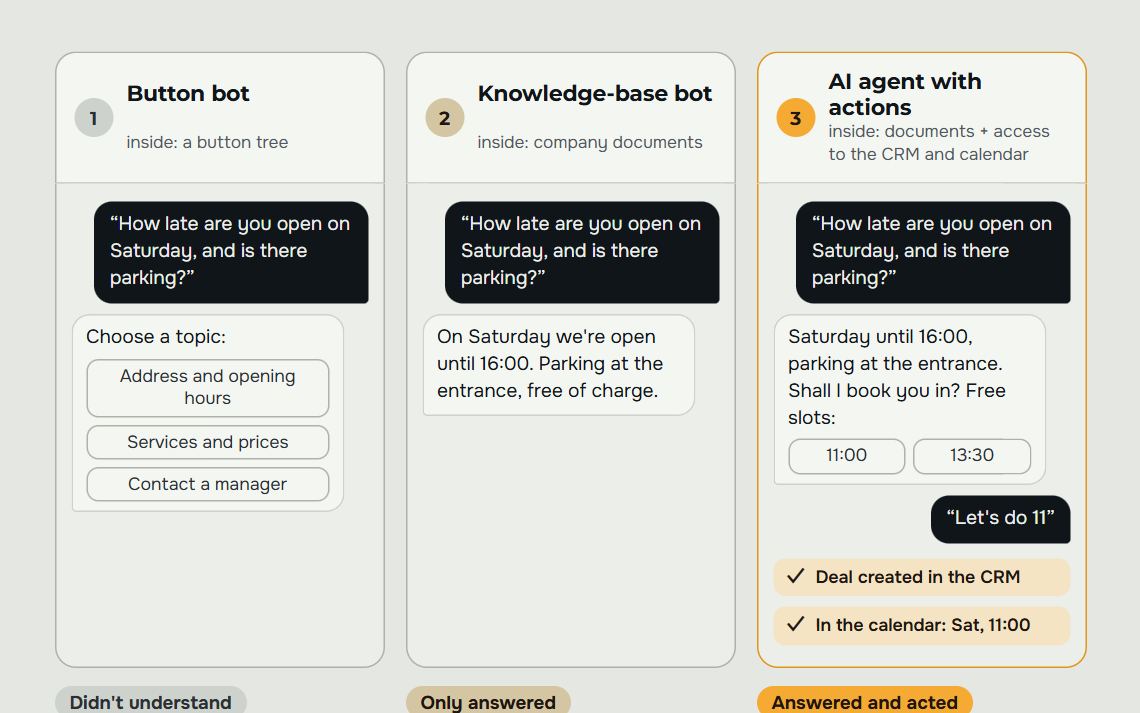
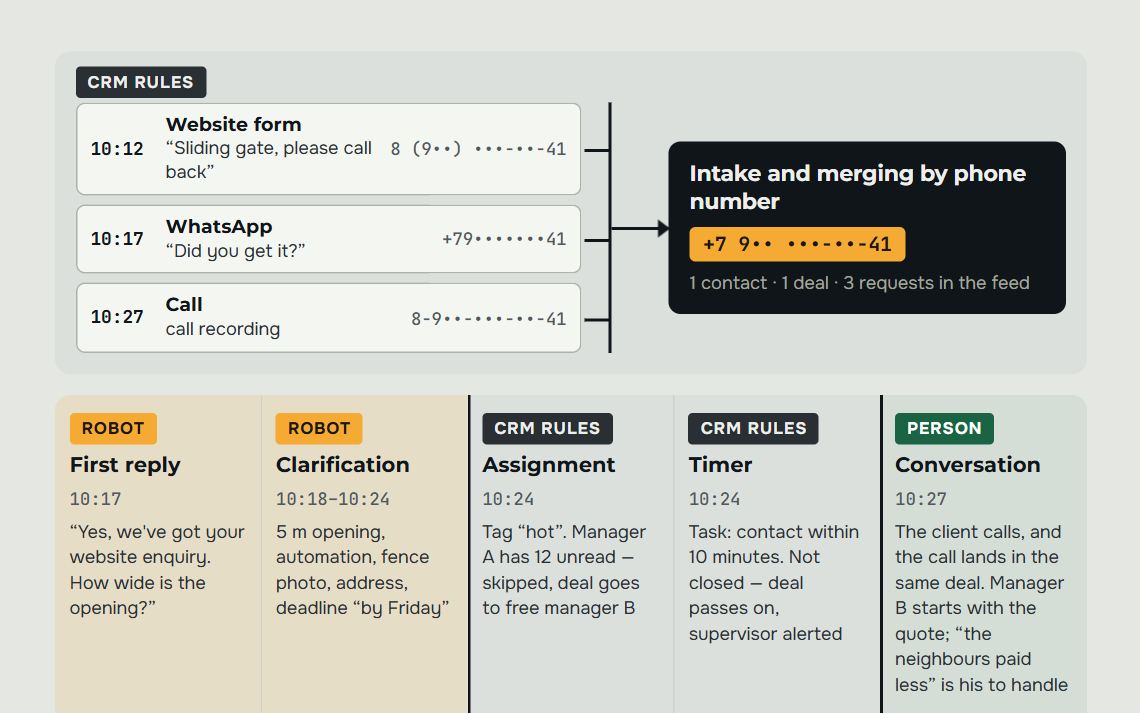
This is where a sales robot takes over from rules: it replies to the client the moment they get in touch, without waiting for a manager to be free.
The robot decides the next step itself based on the situation. For example, if the client hasn’t replied, it picks a better time to write again and records the outcome of the conversation in the CRM. Tasks don’t disappear from the CRM, but the first contact can no longer become overdue: it happens right away.
In the same GetGate project managers free up about an hour of working time a day: it used to go on setting tasks by hand and answering routine questions.
In a blind test on real chats, the assistant’s answer was no worse than a person’s in 80% of cases. So part of the first contact can be trusted to the robot without losing quality. More on the page about the about the sales robot.
What overdue tasks turn into if they are not fixed
An overdue task is a specific client nobody contacted on time.
A telling case from practice: a VIP client worked with one manager, the manager left, and the client was forgotten. In the CRM he was still listed as a VIP client — it’s just that nobody talked to him. In a report such an overdue task looks like a percentage; in reality it’s a lost deal that people find out about too late.
A similar story goes with long-term interest. Deals where the client's decision is postponed for months easily sink among urgent tasks if there is no reminder system for them. The salesperson updates such deals after the fact, with a long overdue, and decides anew when to write to the client — although the right moment for a reminder passed long ago.
The overdue rate alone doesn’t tell you how much money the company is losing: that depends on deal size, niche and how hot the client was. But the longer a task hangs, the higher the chance the client has already found another supplier.
Your own numbers show the scale — use sales analytics: a plan-versus-actual breakdown by channel and manager shows where money is lost first, and only then where tasks pile up.
A weekly review ritual for the head of sales
It makes sense to turn the review of overdue tasks into a regular ritual rather than a one-off check once a quarter. Start with hot deals — those where the client is already ready to pay and the task is more than a day overdue. That is the most expensive category of overdue and it has to be gone through first, while the client has not yet left for a competitor.
Next come tasks on deals in active work — where the manager was supposed to call, write or send a document. Seeing that a task is overdue isn’t enough here. What matters is whether the manager closed it formally or actually got in touch with the client.
Reviewing conversion, calls and communication quality is a matter of rules, scripts and reasons for refusals. That’s the job of to build the sales department.
Last of all come long-term and “sleeping” deals — the clients it is easy to forget because they create no urgency. It is exactly in this category that stories like the forgotten VIP client are most often found. Going through this list regularly, even once a week, costs less time than restoring a relationship with a client who has decided they were forgotten.
Mon10:00–10:30 · Overdue task review
the client is ready to pay but the task is hanging — call today
check not just the fact, but what was actually done
they’re forgotten first — and that’s where big clients get lost
Block lengths are an example. What matters is the order: from hot to dormant.
Where to start putting tasks in order
Before setting up automation rules it is worth reviewing the current sales department and understanding where exactly the money is being lost — at which stages, with which salespeople, on which types of deal. Without this step it is easy to spend time automating the wrong cause: setting up notifications where the problem was motivational, or the other way round.
After the review, pipelines are built around the client’s real process, channels and telephony are connected, and rules for automatic task creation and escalation are set up. If part of the first contact makes sense to hand to the robot — say, replying to leads outside working hours — it is trained for the niche and connected to the same channels the managers already use.
After that the team works under control: plan and actual are visible in real time, and the manager spots a problem in the same week it appears. Fine-tuning and scaling follow as it becomes clear what works in that particular team. More breakdowns of similar situations are on the blog.
Frequently asked questions.
How many overdue tasks count as normal?
Normal is when the number does not grow from week to week. Zero is rare and usually means tasks are being closed without being done.
What to watch is not the count but the age: a task overdue since yesterday is a working situation, a task hanging for a month is no longer a task but rubbish. Splitting them by age shows at once where it is discipline and where a broken process.
Can we just close all the overdue tasks and start again?
You can, and sometimes it is the only way to move: a list with hundreds of overdue items is one nobody works through.
But a one-off clean-up without changing the rules gives you exactly the same list a month later. So it makes sense to do the clean-up on the same day as setting up automatic task creation — otherwise it is just moving the problem along.
How do we tell a broken process from sloppiness?
By the distribution. If the overdue items cluster on one or two people, it is about people. If they are spread evenly across everyone, it is about the process, and demanding discipline is pointless.
The second sign is the type of task. When tasks of one kind are overdue for everybody at once, it means that at that point the task is created at the wrong time or given to the wrong person.
Won't automatic task creation become a new source of rubbish?
It will, if the rules are written generously. A task created just in case is the first to go overdue, and the list becomes unreadable again.
So there should be few rules, and each tied to an event after which the action really is obligatory: payment received, conversation ended, the client replied. Everything else is better left to a person's judgement.
What do we do with deals that have no next step?
Those are the ones to find first: a deal with no next step is not overdue, it is simply invisible — and therefore more dangerous than an overdue one.
A simple rule is a separate list of such deals, reviewed at the weekly meeting. It usually turns out that some of them should have been closed as lost long ago, and on the rest nobody dared to make the call.
Let's audit your business
Leave a request and on a free consultation we'll find where customers are being lost, suggest which service to start with and price it around your goal.
Rather not fill in a form? Message our agent on Telegram — it replies right away and books you a review.