Automated enquiry handling in the CRM, step by step
Automated enquiry handling has two layers. CRM rules accept an enquiry from any channel, create a deal, merge duplicates and set tasks. The robot in the chat replies straight away, clarifies the request and hands a hot client over to a manager. People are left with pricing, haggling, complaints and the rules themselves.
The seven steps of handling a lead
Tuesday, 10:12. A client leaves an enquiry on the website, five minutes later writes on WhatsApp “Did you get it?”, and ten minutes after that calls. For the team, that's three contacts in three different windows. For the client, it's one question they're still waiting to have answered.
Automated enquiry handling exists to turn those three contacts into one deal with a reply. Every enquiry follows the same path, wherever it came from. Broken down into steps, there are seven:
- intake: a lead from a form, messenger, Avito or a call lands in the CRM;
- creating a deal with the source, contact and first message;
- merging duplicates if the person has already written or called;
- first reply to the client;
- clarification: what's needed, where, by when, on what budget;
- assignment to a manager;
- a task with a deadline and a reminder if it isn't done.
An enquiry can get stuck at any step. The website form lands in an inbox that gets opened once a day. The Avito chat lives in an app on the boss's phone. A manager saw the enquiry, replied “let me work out the price” and never set himself a task. Automation closes these gaps one by one, and it's worth starting with the one where you lose the most.
Times 10:12, 10:17 and 10:27 are from the article's example; the rest is illustrative. Numbers written with 8, with a plus or with hyphens are normalised to one format, so all three requests land in one deal.
Intake and duplicate merging: one lead, one deal
The first condition: every channel leads into one CRM. The website form, WhatsApp, Telegram, Avito chats and telephony connect to amoCRM or Bitrix24 through standard integrations. A new enquiry creates a deal on its own, with the source, the message text or the call recording. If even one channel lives on a manager's personal phone, its leads don't exist for the team.
Avito is most often the one that gets forgotten. Yet messaging on the platform overtook calls long ago: according to CNews data for February 2024, Avito's messenger accounted for 55% of first contacts between users. If the platform's chats aren't connected to the CRM, more than half of the enquiries from there bypass the pipeline.
Merging duplicates is the step people remember too late. The client from the example above left a phone number on the website and wrote on WhatsApp from the same number. The CRM checks the phone and email against existing contacts and adds the new message to the open deal. Without that rule, two managers end up with two clients, and both will call the same person.
The most reliable way to merge is by phone number normalised to a single format: a number with a leading 8, with a plus and with brackets must become one record. On Telegram and Avito there's often no number at all. Then the link to the contact appears later, when the robot or a manager asks for a phone number in the chat.
Calls are the hardest: there's no text, just a number and a recording. Telephony connected to the CRM creates a deal for every incoming call, including missed ones, and attaches the call recording. If the client got through and agreed on something with the manager verbally, the outcome still has to end up in the deal card. Otherwise, tomorrow nobody will find it except the person who picked up the phone.
How automation takes in an enquiry from each channel.
| Channel | What automation does | Where it ends up |
|---|---|---|
| Website form | Creates a deal with the enquiry text and checks the phone number against existing contacts | Into the CRM pipeline with the source “website”, not as an email in a shared inbox |
| WhatsApp and Telegram | Creates a deal or adds the message to an open one; the robot replies and clarifies the task | Into this customer’s deal if the number matches; in Telegram the link appears once the customer gives a phone number |
| Avito chats | Pulls the chat through the integration; the robot replies and asks for a phone number | Into a deal linked to the listing the buyer came from |
| Incoming call | Creates a deal for every call and attaches the recording | Into the customer card; the manager adds the outcome of the call |
| Missed call | Creates a flagged deal, sets the duty manager a task to call back and messages the customer on WhatsApp | Into the duty manager’s tasks, with a timer for the first response |
CRM rules and the robot in the chat: who takes which step
Handling steps fall into two groups. The first is mechanical: create a deal, find a duplicate, assign an owner, set a task, send a reminder. These are done by the CRM's own rules: triggers and the Digital Pipeline in amoCRM, robots and business processes in Bitrix24. A rule fires the same way day and night and doesn't need a single word from the client.
An example. Thursday, 19:50, a call to the main number, nobody picks up. A rule creates a deal marked “missed”, gives the on-duty manager a task to call back and sends the client a short WhatsApp message: “We saw your call, what can we help you with?” No human has touched this enquiry yet. It's already being worked on.
The second group is the steps where someone has to actually talk to the client: a first reply with substance, clarifying the request, the question “and how much with installation?”. A template auto-reply is little help here: the client writes in their own words, sends a voice message or a photo. These steps go to the robot in the chat, an AI agent that answers from your knowledge base and writes the outcome of the conversation into the deal card.
The line comes down to a simple question: do you need to understand what the client said? If not, a rule will do. If so, you need a robot or a person. Other routine sales operations that automation takes over are collected on our page about sales department automation.
The first reply and clarification before a manager steps in
Saturday, 12:05. A message lands in an Avito chat: “Hi, do you make sliding gates? The opening is about five metres.” The robot replies right away that you do and asks whether automation is needed. The client sends a photo of the fence. The robot checks whether there's power nearby, asks for a phone number for the surveyor and offers a measurement slot on Monday.
By the time a manager opens the enquiry, the card already holds the essentials: what's needed, dimensions, address, a convenient time, phone number. They won't have to start with “How can I help you?”. They pick up where the robot left off, and the client doesn't have to explain everything again.
We tested the quality of such replies blind on real conversations: in 80% of cases the assistant's reply was rated no worse than a human's. The remaining cases show where to draw the line. Wherever the robot gets confused, it should call a manager straight away rather than try to wriggle out on its own.
In automated processing the robot takes on the first reply and clarification, and the manager's speed matters at the next step. How much time they have for it and where it gets lost is covered next.
How much time you have for the first reply
There is no single norm: a minute of waiting costs differently in an online shop and in a deal with three approvals. A better guide is that the client almost always wrote to more than just you, and the conversation continues with whoever replied first. Find your own threshold in your own data: compare how often people buy when they got an immediate reply versus when they waited several hours.
Channels wait differently. A caller waits right now and, if they can't get through, dials the next company. In a messenger, a person writes and switches to something else; a quick, substantive reply won't even register as a delay. A website form is the coldest channel: the person has left the page and may forget about the enquiry if there's no response for a long time.
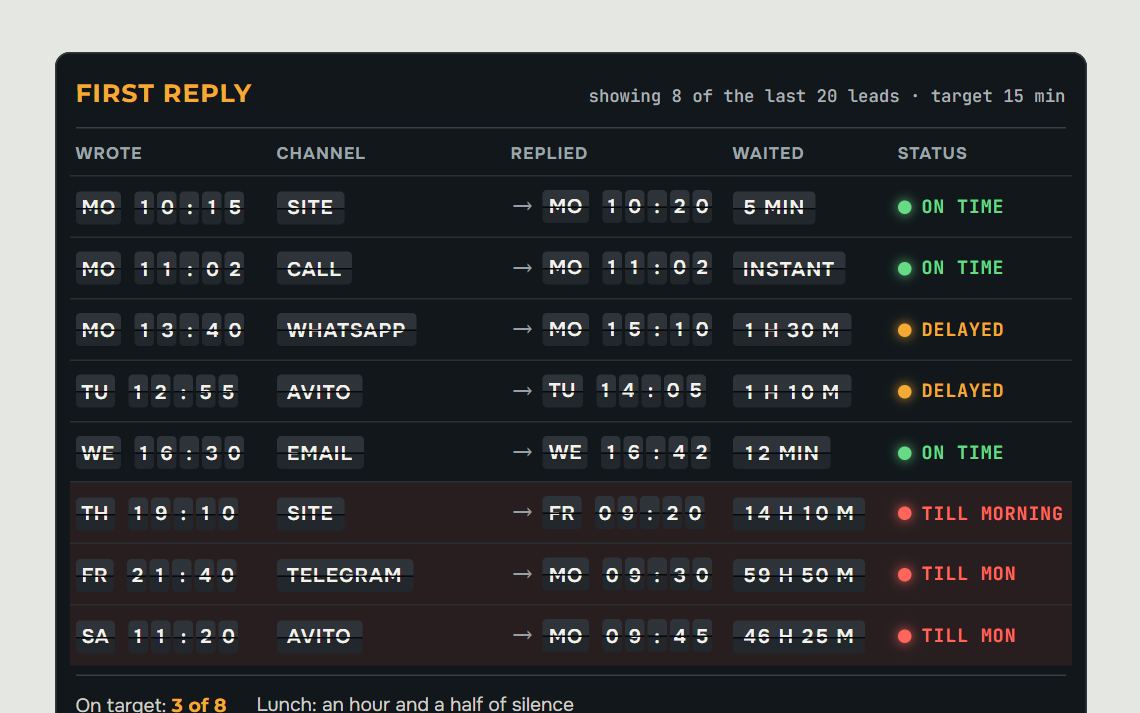
Time is lost in three segments. Until the message is seen: the channel isn't connected, the notification went to a personal phone. Until someone replies: this is the manager's zone, and it is usually the shortest. Until a substantive reply: the manager is waiting for the warehouse or accounting. Measure the segments separately, or the sales team will be held responsible for other people's time.
The first reply and the full reply are two different messages. Within a minute you send “Got it! I'll check stock at the warehouse and get back to you by 4 pm”, and the quote at the promised time. The client waits calmly because they know what to expect and when. Demanding the full reply at once is the worst option: the manager either stays silent until everything is gathered or answers at random.
Fines for slow replies don't work well either: people start replying fast and empty, just to tick the box on time. Predictable gaps — lunch, end of the day, Monday morning — are closed by the schedule. A specific person is put on duty for incoming messages at those hours, and a different one each day.
Distribution: hot leads skip the queue
The simplest distribution is round-robin: the first enquiry goes to one manager, the second to another, the third back to the first. It's fair but blind. Example: Monday, 09:40, one manager has twelve unread messages in the queue, the other has none. A client ready to pay today lands with the first one by rotation and waits.
Distribution runs noticeably more smoothly if it takes three things into account. Who is at work right now: a manager on holiday or off shift gets no new leads. How many unprocessed deals they have: the rule skips anyone whose queue is over the threshold. And how hot the lead is: the robot determines that while asking its clarifying questions.
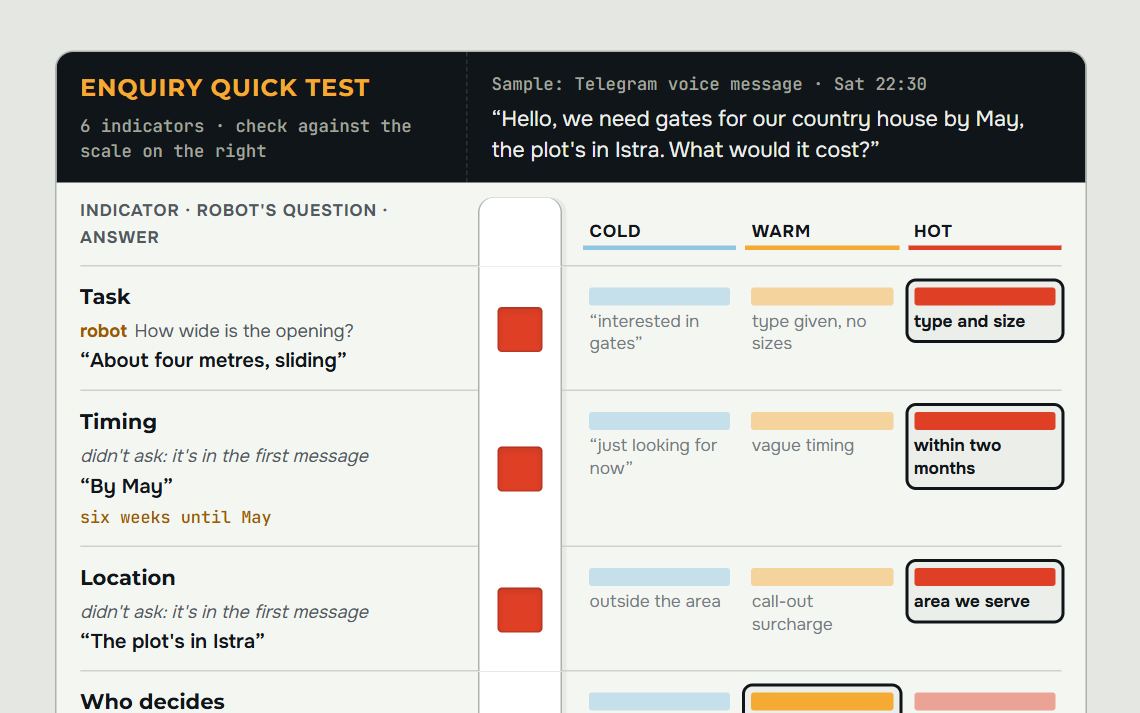
You define the signs of a hot enquiry in the words of your own process. The client named a deadline, “we need it by Friday”, asked about payment, agreed to a site measurement. The robot sets a tag, the CRM hands the deal to a free manager and sends them a notification in Telegram. A “just wanted to know the price” question goes to the general queue and calmly waits its turn.
The last element is a timer. A rule gives the manager a task to get in touch within, say, 10 minutes. If the task isn't closed, the deal passes to the next person and the head of sales gets an alert. Without a timer, distribution ends at the moment of assignment, and the enquiry quietly sits with whoever went to lunch.
What to leave to people
Rules and the robot handle a stream of identical steps well. But there are decisions you shouldn't hand over to them. A price outside the price list, a discount, haggling. A non-standard order that needs costing. A complaint and an irritated client. A “call me” request, when the person would rather talk.
An example from a chat: “You did it cheaper for our neighbours, can you do the same?” The robot doesn't invent a discount. It replies that it will check with a manager and hands over the deal with a short summary: what the property is, what the dimensions are, what exactly the client is asking for. A few minutes later the manager writes in the same chat, and for the client the conversation carries on without a break.
One more thing stays with people: the rules themselves. What counts as a hot enquiry, how many minutes are allowed for a response, when an enquiry is marked as lost. Automation carries these decisions out, but the head of sales makes them. It's worth reviewing them once a month against the numbers from the next section.
Enquiries in the evening and at weekends
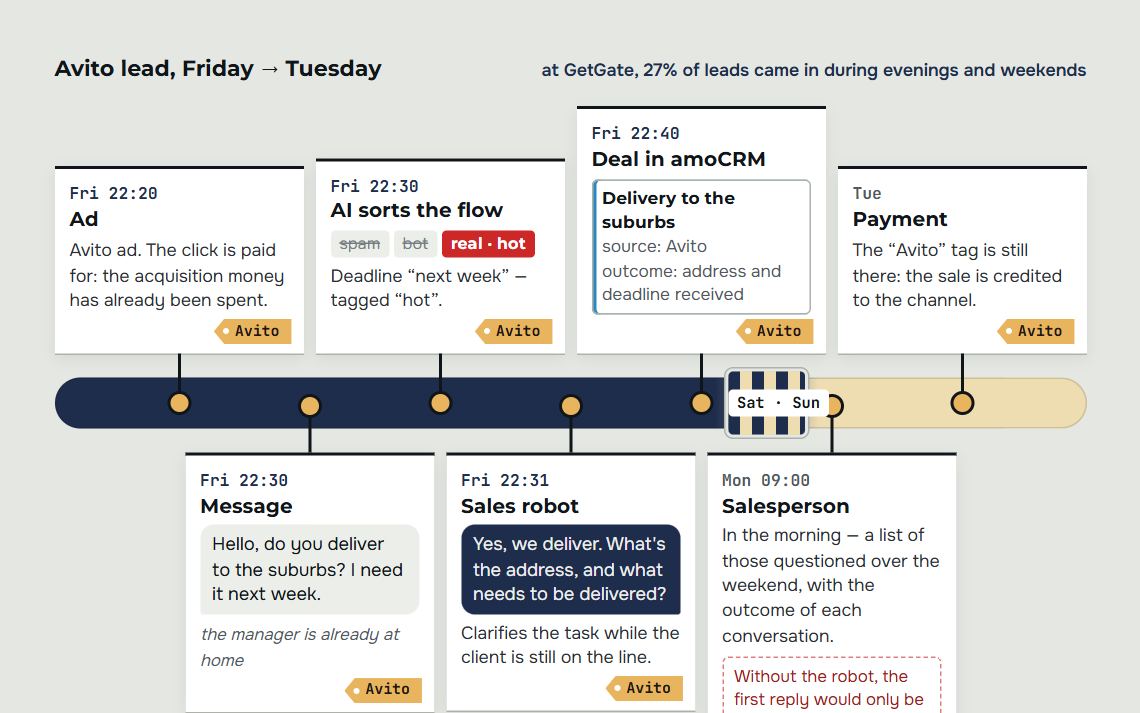
The team works nine to six, but clients don't live like that: someone chooses a contractor at eleven at night, someone writes on Saturday when they finally get round to it. While the office is closed, the enquiry waits until morning, and the person manages to write to three more companies. These are often the hottest enquiries: the client writes when the need arises.
| Who replies after closing time | When it fits | Weak spot |
|---|---|---|
| On-duty manager | Few evening enquiries, the questions are new every time | Costs money and depends on one person |
| Button bot | Questions fit into three or four scenarios: price, availability, booking | Gets lost as soon as a question goes beyond the scenario |
| Sales robot | Many enquiries, different channels, the client expects a conversation | Needs a knowledge base and handover rules |
In the evening the robot replies the same way as during the day, on questions it knows the answer to. A separate night mode full of apologies only underlines that nobody is dealing with the client right now. Where a person is needed, the robot names a specific time: “a manager will join tomorrow at 9:30”, not “shortly”. Clients wait calmly until morning if they know they are waiting until morning.
The evening flow is often underestimated because of the report. If enquiries are entered by hand in the mornings, the deal creation time shows the morning, and the evening disappears. Count by the time the client wrote. And check the setup by comparison: do evening enquiries reach a deal as often as daytime ones, and how many of them got no reply at all.
Missed call: what to do in the first minutes
A message can be read tomorrow, but a missed call leaves only a number. You don't know what the person wanted or whether they have already called others. Call back the same day: a call the next morning about yesterday's missed call feels like a formality.
The working sequence is one call followed by a messenger message to the same number: “Hello, you called us half an hour ago. Let me know what it's about and I'll answer here.” A second and third call in a row add little: the person is driving, in a meeting or doesn't recognise the number. If the call came in the evening, the message goes out automatically, as in the Thursday example above.
Calls to a shared number get lost most quietly: a missed call has no owner. A CRM rule should assign a responsible person automatically. When reviewing, first cross out what isn't a loss: the client got through on the second attempt, a supplier called, or someone dialled the wrong number. The list usually shrinks by half.
Then watch two numbers. The share of missed calls that got a callback or message the same day. And the share that got nothing at all. The second number is the real loss; it should tend to zero and starts changing within a week of a new rule.
Three numbers that show the handling works
The first is time to first reply. Measure it from deal creation to the first outgoing message or call, separately for the robot and for managers. Look at the worst cases. One enquiry that waited from morning till evening says more about a hole in the setup than a decent monthly average.
The second is the share of unanswered leads. These are deals where the client wrote and there's still no outgoing message an hour later or by the end of the day. In amoCRM this list is a filter by stage and time without activity; in Bitrix24, a report on deals with no activities. In a healthy setup it's almost empty, and you can explain every line in it.
The third is duplicates. Once a week, export contacts that share a phone number. If there are many, merging isn't working in some channel: most often the telephony writes the number in its own format, or the website form creates a contact bypassing the check. Every duplicate means two calls to one client and two leads in the report where there was one.
Gauge readings are a hypothetical one-week example. The hour a day is a result from a live GetGate project. Change one step at a time to see what exactly worked.
You can see the result in the managers themselves, too. In the live GetGate project, where automation took over intake, deals and tasks, each manager freed up about an hour a day. That hour goes into conversations with hot clients, which is what the handling was set up for in the first place.
Where to start with automated lead handling
Start with an inventory of channels. List every place where clients write and call: website, phone, WhatsApp, Telegram, Avito, email, managers' personal numbers. Next to each, note whether the lead reaches the CRM on its own. Connect everything that doesn't first: without that, there's nothing to build the other steps on.
Then follow the path of an enquiry, step by step:
- connect your channels to the CRM and turn on duplicate merging by phone number;
- set up distribution that accounts for shifts, plus a first-response timer;
- set an automatic task and reminder on every new deal;
- launch the robot on one channel, such as Avito or WhatsApp, and read the first 20 conversations in full;
- set up three reports: response time, unanswered enquiries, duplicates.
It's easier to build the pipeline, fields and rules around this path from the start, and that's exactly what we do during an amoCRM implementation. If your main pain is enquiries after the office closes, start with the section on evenings and weekends: it compares a duty manager, a bot and a robot.
After a month, compare three numbers with what you had before launch. If response time has dropped but the number of unanswered enquiries hasn't, look for a hole in distribution or in the timer. If duplicates are growing, check the channel that writes phone numbers its own way. Change one step at a time so you can see what exactly worked.
Frequently asked questions.
Can enquiry handling be automated without an AI robot?
Yes, a good share of it. Intake from channels, deal creation, duplicate merging, distribution, tasks and reminders are handled by the CRM's own rules, with no AI at all.
Without a robot, the first substantive reply and clarifying the request stay manual. If you don't get many enquiries and the manager replies quickly, that's enough. A robot is needed when the flow is large or clients write at hours when nobody is there to reply.
How do you merge duplicates if a client wrote on Telegram without a phone number?
Not right away: merging works by phone or email, and on Telegram you usually can't see them. A separate deal gets created.
Ask for a phone number in the chat; the robot can do this while clarifying the enquiry. As soon as the number appears in the card, the CRM finds the existing contact and merges the history. Once a week, check an export of contacts with matching numbers to catch what the rule missed.
What happens if the robot makes a mistake and doesn't flag a hot enquiry?
It will land in the general queue and get a reply later. That's why the first-response timer is set on all leads, including ordinary ones.
For the first few weeks, read the conversations where the client bought or walked away and look for signs the robot missed. They get added to the rules. If the robot is unsure, let it call in a manager.
Which CRM is right for automated enquiry handling?
Both amoCRM and Bitrix24 will do: both accept enquiries from the website, telephony, messengers and Avito, find duplicates and can distribute deals by rules.
amoCRM is easier to set up and strong at messaging with clients. Bitrix24 has more built-in tools, but setup is harder too. Pick the one your managers will actually work in every day.
Do you need automatic distribution if there's only one manager on the team?
There's no one to distribute to, but the other steps are just as necessary. Intake into one CRM, merging duplicates, and a task and reminder for every new deal protect against forgotten enquiries even with a single manager.
Instead of distribution, set up priority: hot leads rise to the top and arrive as a notification in Telegram. When a manager is busy or off shift, the robot handles the first reply and the clarifying questions.
How quickly should a manager reply to a client?
There is no general norm, and figures from other niches help little. A practical rule: reply to website forms and messenger messages within minutes, and to calls immediately or call back within the same hour.
Find your own threshold in a month's CRM export: compare how often people buy when they got an immediate reply versus when they waited for hours. Look at the worst cases, not the average time.
Let's audit your business
Leave a request and on a free consultation we'll find where customers are being lost, suggest which service to start with and price it around your goal.
Rather not fill in a form? Message our agent on Telegram — it replies right away and books you a review.